

What Is the Best PC for Golf Simulator 4K in 2026?
Quick Answer: The Uneekor EYE MINI CORE Golf Launch Monitor & Simulator stands as the best overall PC-based golf simulator system for 4K play in 2026, delivering near-zero latency, 15 ball data points, and compatibility with multiple software platforms including GSPro, TGC19, and E6 Connect. For budget-conscious builders, the SLX MicroSim Indoor Mobile Golf Simulator offers exceptional value at a fraction of the cost, including a 6-month E6 Connect license and patented below-the-grip sensor accuracy. Complete enclosure packages range from $800 to $1,500, while dedicated 4K projectors like the Optoma GT3900UHD cost $1,499. Whether you’re investing in a premium launch monitor or building a DIY cage setup, modern golf simulators in 2026 deliver immersive 4K experiences that rival professional training facilities. The key is matching your PC specifications to your chosen software and launch monitor hardware.
Golf simulation technology has evolved dramatically, transforming how golfers practice indoors year-round. A proper 4K golf simulator setup requires three core components: a launch monitor or swing sensor, a powerful PC meeting software requirements, and a display system (projector or monitor). The PC market in 2026 offers diverse options, from portable mobile simulators that work with smartphones to high-end systems requiring dedicated gaming laptops with RTX graphics cards and 32GB RAM. Understanding which PC configuration matches your specific simulator hardware and software choice is critical for avoiding compatibility issues and maximizing your investment. This guide reviews six products spanning the full spectrum of golf simulator solutions, from budget-friendly motion sensors to professional-grade launch monitors paired with 4K projectors.
Which PC Golf Simulator Systems Stand Out in 2026?
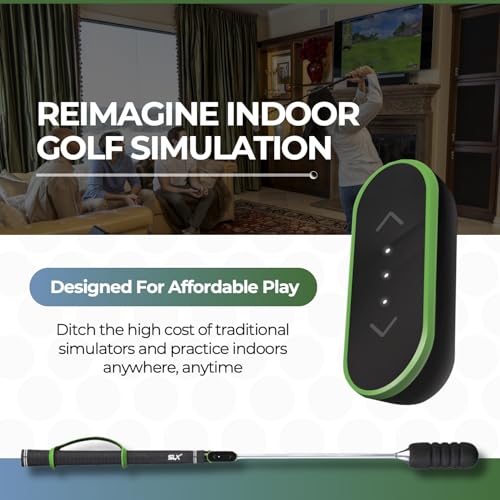
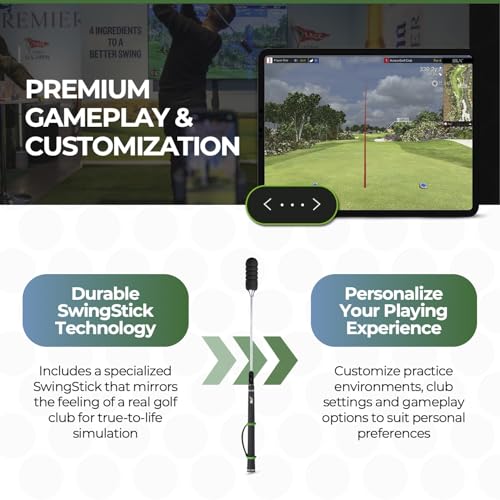
SLX MicroSim Indoor Mobile Golf Simulator

SLX MicroSim Indoor Golf Simulator with Motion Sensor
- FULL 4K HOME GOLF SIMULATOR: Software through E6 CONNECT. Tittle X and Divot Island combined to bring you SwingLogic Ventures. License included for 6 months ($60). Expanded content available for $9.99/month. Battle Ship, Long Drive, Closest to the Pin, included in expanded content license available from E6.
- INDOOR/OUTDOOR GOLF: Practice golf for fun and DURING COLD WEATHER: High quality swing stick provided for indoor use. Highest accuracy in its price range using the patented below the grip sensor placement. Accuracy can be calibrated within E6 CONNECT. Experience 3D swing analysis and golf at some of the most famous courses in the world with the expanded content.
- GOLF FOR ALL AGES AND ALL ABILITIES: Simple to pick up and begin after registration and Mobile App download or E6 Connect download. Can be used while in a wheelchair or sitting down.
- USE REAL GOLF CLUBS: Extremely accurate with foam golf balls. Real golf balls can be used with driver or off a soft hitting mat. Accuracy with real golf balls can be improved with calibration and simple mounting adjustments or using a tee to limit ground interaction. Shock and vibration data can impact simulator results with real golf balls. Continual firmware updates to improve accuracy for putting and use with real golf balls to limit shock and vibration data.
- FAST SIMULATOR RESPONSE TIMES...The Processing and Algorithmic Swing Interpretation are incredibly fast improving the indoor golf experience with almost no lag time between swing and seeing your shot on the screen.



As an Amazon Associate we earn from qualifying purchases. Product prices and availability are accurate as of the date/time indicated.
The SLX MicroSim represents an accessible entry point into 4K golf simulation, utilizing patented below-the-grip sensor technology for accurate swing detection compatible with Android, iOS, and PC platforms. This system includes a 6-month E6 Connect license (valued at $60) and works with real golf clubs and foam balls, making it ideal for golfers transitioning from traditional practice to indoor simulation. The motion sensor placement below the grip provides superior accuracy compared to standard overhead sensors, and the system supports E6 Connect, GSPro, and CreativeGolf software platforms.
Best For: Budget-conscious golfers, all-ability players including wheelchair users, and those seeking portability between indoor and outdoor spaces. The seated-play capability and simple setup make it excellent for seniors or players with mobility considerations.
Pros: Includes valuable 6-month E6 Connect license at no additional cost; works with real golf clubs and foam balls; patented sensor placement ensures accuracy at this price point; fast response times with near-zero lag; accessible design accommodates all abilities and physical conditions; compatible with multiple software platforms.
Cons: No customer reviews available to verify real-world performance; real golf ball accuracy requires calibration adjustments and may be affected by shock and vibration; expanded content features require separate $9.99/month subscription; missing product dimensions and weight specifications limit portability assessment.
Complete Golf Simulator Enclosure Package – 4K-Ready Impact Screen with Blackout Cage

Complete Golf Simulator Enclosure with 4K Impact Screen
- COMPLETE GOLF SIMULATOR ENCLOSURE — TRAIN WITH CONFIDENCE – Designed for serious golfers who want a professional-grade practice space at home and beginners looking to practice their swing. This all-in-one golf simulator cage delivers durability, safety, and a clean visual setup—without the complexity or cost of high-end custom builds.
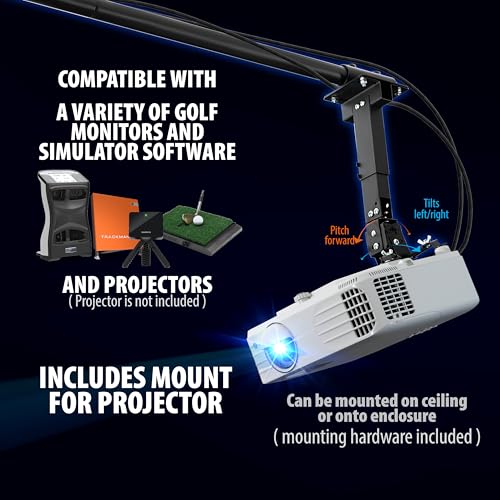
- PROJECTOR MOUNT INCLUDED: The best-selling golf simulator enclosure with a projector mount and all poles needed. Huge cost and time saver
- WHAT’S NOT INCLUDED: The turf and projector shown in the images are for demonstration purposes only and are not included with this purchase.
- 4K-READY IMPACT SCREEN WITH NEAR-FULL COVERAGE – Includes a premium impact screen engineered for crisp visuals and repeated ball strikes. The screen is precision-sized just 1 inch smaller than the frame for a tight, immersive hitting area with minimal light bleed.
- MULTIPLE SIZE OPTIONS FOR ANY SPACE– Available in multiple cage sizes to fit your setup, whether you’re building a garage simulator, basement bay, or dedicated golf studio. Designed to maximize hitting space without overwhelming your room.
- MULTIPLE SIZE OPTIONS FOR ANY SPACE– Available in multiple cage sizes to fit your setup, whether you’re building a garage simulator, basement bay, or dedicated golf studio. Designed to maximize hitting space without overwhelming your room.
- EASY ASSEMBLY — NO SPECIAL TOOLS REQUIRED: From unboxing to first swing in under an hour. Simple, intuitive setup with clearly fitting components—no drilling, no headaches, no engineering degree needed.
- 12-MONTH NO-QUESTIONS-ASKED WARRANTY: We stand by our gear and our golfers. Every considered enclosure is backed by a 12-month warranty and responsive U.S.-based phone and email support, Monday–Friday, 9 AM–5 PM EST.




As an Amazon Associate we earn from qualifying purchases. Product prices and availability are accurate as of the date/time indicated.
This comprehensive enclosure package provides the physical infrastructure for a professional home golf simulator setup, featuring a 4K-ready impact screen, projector mount, blackout cage frame, side shank nets, and all necessary poles. The package eliminates the complexity of sourcing individual components separately, offering a complete solution that accommodates various room sizes from garage bays to dedicated golf studios. Assembly requires no special tools or drilling and completes in under one hour, making it accessible for DIY installers without technical expertise.
Best For: Homeowners building complete golf simulator installations in garages, basements, or spare rooms; those seeking a turnkey enclosure solution without custom fabrication; golfers wanting professional-grade durability and safety without high-end custom build costs.
Pros: Complete package includes projector mount and all frame poles, eliminating separate purchases and setup complexity; 4K-ready impact screen handles repeated ball strikes reliably; assembly under one hour with no special tools required; multiple size options fit various spaces; 12-month warranty with responsive U.S.-based customer support.
Cons: Projector and turf shown in promotional images are not included, requiring additional investment; no customer reviews available to verify durability claims; not eligible for Prime shipping, potentially increasing delivery times and costs; turf and projector must be purchased separately.
SVPRO USB Camera 1080P 120fps High Speed Camera for Golf Swing Simulator (B0DY4TXWM5)

SVPRO 1080P 120fps USB Camera with 3X Zoom for Golf & Sports
- High Speed: With this high-speed UVC camera, you can enjoy programmable frame rates, with the potential to reach up to 120fps at 1080p resolution that ensures smooth and fluid video capture.
- High Resolution: This USB camera utilizes a 1/2.3" 12MP image sensor, achieving a maximum still resolution of 3840x3040 pixels 30fps which can help you capture incredibly detailed images.
- The zoomable Lens 3.6-10mm, manual zoom,focus and aperture enables creative controls via the 3X optical zoom,great for shooting in detail at different distance and always delivers clear and precise images.
- USB Plug and Play: This camera has effortless compatibility with Windows,Linux,MacOS and Andriod through usb plug and play functionality, eliminating the need for additional drivers. Simply connect the camera to PC computer, laptops,Android devices or Raspberry Pi via USB cable. No specific software required, it works with most professional video program and regular webcam software.
- Great Low Light Performance: This high speed camera adopt IMX577 sensor, capable of capturing clear images in low light environments.
- Versatile Usage:: This camera is versatile and can be used in a wide range of scenarios where high-quality imaging and video recording are needed,not only an industrial camera for video systems, 3D scanners, lightburn cameras, 3d printer, computer vision, machine visions, industrial inspections and sports analysis. Also can use for webcam and small surveillance camera. This high speed zoom camera is also perfect for capturing fast-moving objects such as using for golf simulator.
- Please Note: Certain video software like Quicktime has frame rate limitations, when you need to operate 120fps,please use other professional video software that that can set higher frame rate.


As an Amazon Associate we earn from qualifying purchases. Product prices and availability are accurate as of the date/time indicated.
This SVPRO high-speed USB camera captures golf swings at 120fps in 1080p resolution with a 12MP image sensor capable of 4K stills at 30fps. The 3X manual optical zoom lens (3.6-10mm) provides flexibility for detailed swing analysis at various distances, while USB plug-and-play connectivity eliminates driver installation requirements. The camera works seamlessly with Windows, Linux, macOS, and Android devices, making it compatible with most golf simulator software and professional video analysis programs. IMX577 sensor technology delivers excellent low-light performance for indoor golf facilities.
Best For: Golfers seeking detailed swing video analysis, simulator builders wanting integrated camera feedback, and those requiring high-speed capture for slow-motion swing review. Ideal for coaches analyzing multiple students or serious players tracking swing mechanics over time.
Pros: 120fps at 1080p provides smooth slow-motion swing analysis; 12MP sensor captures detailed 4K still images at 30fps; 3X optical zoom enables framing flexibility; USB plug-and-play requires no driver installation; excellent low-light performance with IMX577 sensor; compatible with Windows, Linux, macOS, and Android.
Cons: 1080p video resolution at 120fps may not fully utilize 4K simulator displays; manual zoom and focus require adjustment between shots; no automatic tracking features for swing analysis; limited to USB power delivery; no built-in swing analysis software included.
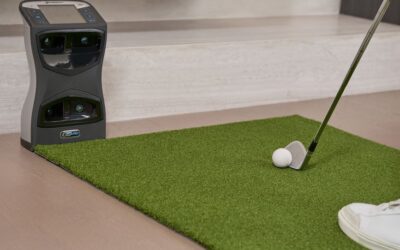
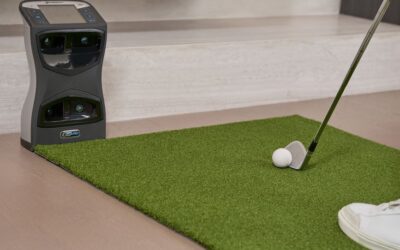
Uneekor EYE MINI CORE Golf Launch Monitor & Simulator

Uneekor EYE MINI CORE Golf Launch Monitor - 15 Data Points
- Real-Time Tracking with Dimple Optix – High-speed cameras and infrared sensors provide near-zero latency for real immersion. Dimple Optix reads any dimple pattern, requiring no ball stickers, meaning you can use any golf ball of your choice.
- VIEW Software Included – Analyze your swing with 15 ball data points. Includes session reports to track progress. Pair with Swing Optix (sold separately) to unlock AI Trainer feedback and insights.
- 3-Month Trial of Ultimate Package Included – Experience championship courses in immersive 4K with GameDay competitive modes. Includes online play, skills training, mini-games, and head-to-head challenges for every level of golfer (dual displays required).
- Third-Party Software Compatible – Works with GSPro, E6 Connect, TGC19, Creative Golf 3D (subscription required). Play full golf courses, mini games, practice modes & tournaments from your home simulator setup.
- PC/Laptop Requirements – For VIEW: i5 Gen12/Ryzen5+, 16GB RAM, 256GB SSD, RTX3060(6GB), Win11, RJ45, 25Mbps. For Simulation: i7 Gen12/Ryzen7+, 32GB RAM, RTX4070(16GB).
- Real-Time Tracking with Club Optix – Club Optix delivers real-time visuals of your club at impact allowing for instant feedback (available with software upgrade).


As an Amazon Associate we earn from qualifying purchases. Product prices and availability are accurate as of the date/time indicated.
The Uneekor EYE MINI CORE represents the premium launch monitor solution for 2026, delivering near-zero latency tracking with Dimple Optix technology that reads any golf ball’s dimple pattern without requiring stickers. This system provides 15 ball data points including carry distance, launch angle, spin rate, and ball speed, enabling comprehensive swing analysis through the included VIEW software. The 3-month trial of the Ultimate Package unlocks championship courses in immersive 4K, competitive GameDay modes, and online play. Compatibility with GSPro, E6 Connect, TGC19, and Creative Golf 3D ensures flexibility across software ecosystems.
Best For: Serious golfers and instructors requiring professional-grade ball tracking data; those building high-end simulator installations with dedicated gaming PCs; players wanting comprehensive swing analysis with AI Trainer feedback (via Swing Optix); competitive golfers seeking tournament-style gameplay.
Pros: Near-zero latency provides immersive real-time feedback; Dimple Optix reads any golf ball without stickers; 15 ball data points enable detailed swing analysis; VIEW software included with session tracking; 3-month Ultimate Package trial includes 4K courses and GameDay modes; compatible with major third-party software platforms; AI Trainer feedback available through Swing Optix.
Cons: Highest cost at $1,249, requiring significant investment; PC requirements demanding (i7 Gen12/Ryzen7+, 32GB RAM, RTX4070 for simulation); Swing Optix sold separately for AI feedback features; 3-month trial expires requiring subscription commitment; dual displays required for full GameDay features; subscription costs not transparent in base pricing.
SVPRO USB Camera 1080P 120fps High Speed Camera for Golf Swing (B0H43XPRVN)

1080p 120fps USB Camera with 3X Zoom for Golf & Sports
- High Speed: With this high-speed UVC camera, you can enjoy programmable frame rates, with the potential to reach up to 120fps at 1High Resolution – 12MP Still Images: Equipped with a 1/2.3" 12MP image sensor (IMX577), this USB camera achieves a maximum still resolution of 3840x3040 pixels at 30fps, allowing you to capture incredibly detailed images for machine vision, 3D scanning, and professional documentation.080p resolution that ensures smooth and fluid video capture.
- High-Speed Video Capture – 120fps at 1080p: This high-speed UVC camera supports programmable frame rates up to 120fps at 1080p resolution, delivering smooth, fluid video capture for fast-moving subjects such as sports analysis, golf simulators, and industrial inspections.
- 3X Manual Optical Zoom Lens (3.6-10mm): The manual zoom, focus, and aperture lens provides 3X optical zoom, giving you creative control to capture clear, precise images at different distances. Ideal for applications requiring flexible framing and depth adjustment.
- USB Plug-and-Play – Wide Compatibility: No additional drivers required. This camera works seamlessly with Windows, Linux, macOS, and Android via USB connection. Simply plug it into a PC, laptop, Android device, or Raspberry Pi. It supports most professional video programs and standard webcam software without needing proprietary applications.
- Versatile Usage:: This camera is versatile and can be used in a wide range of scenarios where high-quality imaging and video recording are needed,not only an industrial camera for video systems, 3D scanners, lightburn cameras, 3d printer, computer vision, machine visions, industrial inspections and sports analysis. Also can use for webcam and small surveillance camera. This high speed zoom camera is also perfect for capturing fast-moving objects such as using for golf simulator.
- Please Note: Some video software like Quicktime has frame rate limitations, when you need to operate 120fps, please make sure the video software support to set higher frame rate.


As an Amazon Associate we earn from qualifying purchases. Product prices and availability are accurate as of the date/time indicated.
This SVPRO model delivers identical high-speed capture capabilities to its counterpart (B0DY4TXWM5), featuring 120fps at 1080p video and 12MP 4K still image capture via a 1/2.3″ IMX577 sensor. The 3.6-10mm manual zoom lens provides 3X optical zoom with independent focus and aperture controls for creative framing flexibility. USB plug-and-play operation requires no driver installation, and the camera supports Windows, Linux, macOS, and Android platforms. Versatile applications include golf simulator integration, sports analysis, 3D scanning, and industrial inspection, making it a multi-purpose investment for simulator builders.
Best For: Simulator enthusiasts needing high-speed swing video capture, multi-purpose users requiring industrial imaging capabilities, and builders integrating camera feedback into custom simulator setups. Excellent for golf coaches analyzing student swings and serious players tracking mechanics.
Pros: 120fps at 1080p smooth video capture for swing analysis; 12MP sensor enables 4K still images at 30fps; 3X manual optical zoom with independent focus and aperture; USB plug-and-play with no driver requirements; versatile applications beyond golf simulation; excellent low-light IMX577 sensor performance; compatible across Windows, Linux, macOS, Android.
Cons: Nearly identical to B0DY4TXWM5 model with minimal differentiation; 1080p video resolution doesn’t fully match 4K simulator displays; manual zoom requires adjustment between shots; no automatic subject tracking; limited built-in analysis software; USB power delivery limitations for extended use.
Optoma GT3900UHD – True 4K UHD Laser Projector for Golf Simulators

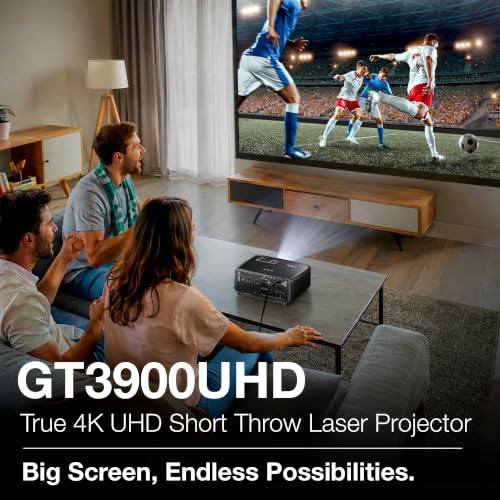
Optoma GT3900UHD 4K Laser Projector for Golf Simulators
- TRUE 4K UHD FOR STUNNING BIG-SCREEN ENTERTAINMENT - Experience incredible True 4K UHD resolution with razor-sharp detail, vibrant colors, and HDR compatibility for immersive movies, sports, gaming, and golf simulation.
- SHORT THROW DESIGN FOR GOLF SIMULATORS & SMALLER SPACES - The 0.496:1 short throw lens projects a large image from a short distance, helping reduce player shadows, maximize room space, and keep the projector safely out of the swing zone. Perfect for golf simulators, home theaters, and immersive gaming setups.
- BRIGHT 4,000 LUMENS FOR LIGHTS-ON VIEWING - Enjoy vivid, high-impact visuals even with ambient light.
- LOW INPUT LAG FOR RESPONSIVE GAMING - Designed for gamers with support for 1080p at 240Hz and 4K/60Hz low input lag, delivering smooth, responsive gameplay for fast-paced console and PC gaming.
- LONG-LIFE DURACORE LASER (UP TO 30,000 HOURS) - Maintenance-free DuraCore laser technology eliminates lamp replacements while providing consistent brightness and reliable performance for years of entertainment.


As an Amazon Associate we earn from qualifying purchases. Product prices and availability are accurate as of the date/time indicated.
The Optoma GT3900UHD delivers true 4K UHD resolution specifically engineered for golf simulator installations, featuring a short-throw 0.496:1 lens that projects large images from minimal distances. This design reduces player shadows, maximizes usable room space, and keeps the projector safely outside the swing zone—critical for simulator safety and image quality. The DuraCore laser technology provides up to 30,000 hours of maintenance-free operation with consistent 4,000 lumens brightness, enabling vivid visuals even with ambient room lighting. Low input lag gaming support (1080p at 240Hz, 4K at 60Hz) ensures responsive feedback for competitive gameplay and swing analysis.
Best For: Golf simulator installations in basements, garages, and home theaters; those prioritizing image quality and brightness for ambient light environments; builders seeking maintenance-free laser projection with long lifespan; competitive players wanting low-latency gaming performance.
Pros: True 4K UHD resolution delivers razor-sharp detail and vibrant colors; short-throw 0.496:1 lens reduces shadows and maximizes space; 4,000 lumens brightness enables lights-on viewing; DuraCore laser lasts 30,000 hours with no lamp replacements; low input lag supports 1080p at 240Hz and 4K at 60Hz; HDR compatible for immersive visuals; designed specifically for golf simulators.
Cons: Premium pricing at $1,499 requires significant investment; short-throw design limits placement flexibility compared to standard projectors; 4K at 60Hz may require high-end PC graphics cards (RTX4070+); no lens shift or keystone correction mentioned; 4,000 lumens may be excessive for small rooms, causing brightness issues.
What Should You Look for When Choosing the Best PC for Golf Simulator 4K?
Selecting the optimal PC for 4K golf simulation requires understanding three interconnected components: your launch monitor or swing sensor, your software platform, and your display system. Each choice influences the others, and compatibility is paramount to avoiding costly mistakes.
Launch Monitor and Sensor Technology: Modern golf simulators use two primary detection methods. Radar-based launch monitors like the Uneekor EYE MINI CORE use infrared sensors and high-speed cameras to track dimple patterns, requiring minimal calibration but demanding powerful PC processors for real-time data interpretation. Motion sensors like the SLX MicroSim use accelerometers and gyroscopes to detect swing characteristics, requiring less processing power but more calibration for accuracy. Launch monitors provide more detailed ball data (carry distance, spin rate, launch angle), while motion sensors focus on swing mechanics. For 4K simulation, launch monitors justify the investment through superior accuracy and detailed feedback.
PC Specifications and Processing Power: Golf simulator software demands vary dramatically. Budget options like E6 Connect run on modest systems (i5 Gen12, 16GB RAM, RTX3060), while premium platforms like TGC2024 and GSPro with 4K graphics require i7 Gen12+ processors, 32GB RAM, and RTX4070+ graphics cards. The Uneekor EYE MINI CORE specifically recommends i7 Gen12/Ryzen7+, 32GB RAM, and RTX4070 (16GB) for full 4K simulation performance. Consider future-proofing: investing in current-generation high-end components (RTX4080 or newer) ensures compatibility with software updates through 2027-2028. Solid-state drives (minimum 256GB NVMe) are essential for fast course loading and reduced latency. Internet connectivity matters—a dedicated 25Mbps+ wired Ethernet connection eliminates Wi-Fi lag that degrades swing feedback.
Software Platform Compatibility: Major golf simulator software platforms include E6 Connect (included with many launch monitors), GSPro (premium graphics and online play), TGC2024 (realistic course modeling), and Creative Golf 3D (budget-friendly option). Each platform has different PC requirements and feature sets. E6 Connect runs on modest systems and excels at swing analysis. GSPro delivers stunning 4K graphics but demands RTX4070+ cards. TGC2024 offers 40+ real-world courses with accurate modeling. Your software choice should drive your PC purchase, not vice versa. Most premium launch monitors support multiple software platforms, providing flexibility. Budget simulators like SLX MicroSim offer good value but may limit software options.
Display System Integration: 4K golf simulators require either a 4K projector (recommended for immersive experiences) or a large 4K monitor (space-saving alternative). Projectors like the Optoma GT3900UHD deliver immersive visuals but introduce latency through image processing. Short-throw designs minimize shadows and reduce setup space. Monitor-based systems (55-65 inch 4K TVs or gaming monitors) eliminate shadow issues and reduce latency but limit the immersive visual experience. Projector brightness matters: 3,000+ lumens handle ambient light, while 2,500 lumens suffice for darkened rooms. Input lag is critical—look for projectors and displays with gaming modes that minimize processing delay between swing and on-screen feedback.
Enclosure and Physical Setup: The Complete Golf Simulator Enclosure Package (B0D8JZDNGG) demonstrates that physical infrastructure impacts performance. A proper enclosure includes impact-resistant screens (handling repeated ball strikes), blackout materials (reducing ambient light for better image quality), shank nets (safety), and proper projector mounting (eliminating shadow interference). Inadequate enclosures lead to damaged screens, poor image quality, and safety hazards. Budget $800-$1,200 for professional-grade enclosures that accommodate 4K projectors and launch monitors. DIY builders can reduce costs but must ensure impact-resistant screens and proper ventilation for projector cooling.
Calibration and Accuracy Considerations: Even premium systems require calibration. Launch monitors need baseline calibration for your specific golf balls, clubs, and hitting surface. Motion sensors like SLX MicroSim benefit from shock and vibration adjustment when using real golf balls. Budget time for initial setup—typically 30-60 minutes—and plan for seasonal recalibration as temperature and humidity affect sensor accuracy. Systems with detailed calibration tools (VIEW software with Uneekor) provide better long-term accuracy than simplified plug-and-play options.
Budget Allocation Framework: A complete 4K golf simulator setup typically costs $2,500-$5,000+. Budget breakdown: launch monitor ($150-$1,250), PC or laptop ($1,000-$2,500), projector ($800-$1,500), enclosure ($800-$1,200), and software/courses ($60-$300/year). Budget builders can start with a motion sensor (SLX MicroSim, $150) and a gaming laptop (RTX3060, $1,000), totaling $1,500 with modest software subscriptions. Premium setups pair the Uneekor EYE MINI CORE ($1,249) with a high-end gaming PC ($2,500) and Optoma GT3900UHD projector ($1,499), totaling $5,250+ before enclosure and software. Mid-range options combining quality launch monitors with RTX4070 systems deliver excellent value at $2,500-$3,500.
Frequently Asked Questions
What PC specs do I need for 4K golf simulator gaming?
For 4K golf simulation, minimum specs include i5 Gen12/Ryzen5, 16GB RAM, RTX3060 (6GB), and 256GB NVMe SSD for basic 4K play. Premium 4K requires i7 Gen12+, 32GB RAM, RTX4070+ (16GB), and 25Mbps wired internet. The Uneekor EYE MINI CORE and Optoma GT3900UHD projector specifically demand RTX4070 for full 4K performance. Older systems (RTX2080) may struggle with native 4K resolution and require downscaling to 1440p.
Can I use a regular laptop for golf simulation, or do I need a gaming PC?
Gaming laptops with RTX3060+ graphics work well for golf simulation, offering portability and adequate performance for most software platforms. Standard laptops with integrated graphics (Intel UHD) cannot handle 4K simulation and will produce lag and stuttering. For 4K, invest in gaming laptops with dedicated RTX4070 cards or build a desktop PC. Laptops generate more heat during extended simulator sessions, so ensure adequate ventilation and cooling pads.
Which golf simulator software works best with 4K projectors?
GSPro and TGC2024 deliver the best 4K visuals with realistic course modeling and immersive graphics. E6 Connect offers excellent swing analysis but lower graphical fidelity. GSPro requires RTX4070+ for native 4K, while TGC2024 scales across various PC specs. Most launch monitors support multiple platforms—choose software first based on visual preferences and course library, then ensure your PC meets those requirements. See our Golf Simulator Sound System Setup guide for audio recommendations that complement 4K visuals.
Is the Uneekor EYE MINI CORE worth the investment for home simulators?
The Uneekor EYE MINI CORE ($1,249) justifies investment for serious golfers, instructors, and competitive players seeking professional-grade ball tracking and swing analysis. Its near-zero latency and 15 data points enable detailed feedback unavailable in budget systems. However, casual players may find excellent value in the SLX MicroSim ($150) with E6 Connect. ROI depends on usage frequency—frequent players (5+ sessions weekly) benefit most from premium launch monitors’ accuracy and detailed metrics.
Do I need to upgrade my internet for golf simulator online play?
Yes, 25Mbps+ wired Ethernet connection is recommended for online competitive play and real-time swing feedback. Wi-Fi introduces latency (50-100ms delays) that degrades swing-to-screen response. Wired connections provide stable, low-latency connectivity essential for accurate shot feedback and online tournaments. Test your connection speed at speedtest.net—anything below 25Mbps may cause lag during online play.
Can I build a 4K golf simulator for under $2,000?
Yes, budget 4K setups cost $1,500-$2,000 by combining the SLX MicroSim ($150), a mid-range gaming laptop with RTX3060 ($1,000), a 55-inch 4K TV ($400), and basic software subscriptions ($50/month). This setup sacrifices premium launch monitor accuracy and immersive projector visuals but delivers functional 4K simulation. Add $800-$1,200 for a basic enclosure to complete the installation within $2,500-$3,000.
Which Best PC for Golf Simulator 4K Should You Buy?
Your ideal golf simulator PC depends on your budget, space constraints, and gameplay priorities. Here’s how to choose:
Best Overall Value: The Uneekor EYE MINI CORE Golf Launch Monitor & Simulator paired with a high-end gaming PC (RTX4070+, 32GB RAM) and Optoma GT3900UHD projector delivers professional-grade performance justifying the $5,000+ investment for serious golfers. This combination provides near-zero latency, 15 ball data points, stunning 4K visuals, and compatibility with multiple software platforms. The short-throw Optoma projector eliminates shadows while maximizing room space, and the Uneekor’s Dimple Optix technology works with any golf ball without stickers.
Best Budget Option: Start with the SLX MicroSim Indoor Mobile Golf Simulator ($150) using E6 Connect software on a modest gaming laptop (RTX3060, 16GB RAM, $1,000). This $1,150 foundation delivers surprising accuracy through patented below-grip sensor technology and includes a valuable 6-month E6 Connect license. Upgrade to a 4K projector and enclosure later as your simulator skills develop and budget allows. This approach reduces initial investment while preserving upgrade flexibility.
Best for Complete DIY Builds: Combine the Complete Golf Simulator Enclosure Package ($800) with a launch monitor of choice, gaming PC meeting your software requirements, and a 4K projector. This modular approach lets you select components independently, optimizing for specific software platforms and space constraints. The enclosure handles all physical infrastructure, eliminating custom fabrication and reducing assembly complexity to under one hour.
Best for Swing Analysis and Coaching: Pair the Uneekor EYE MINI CORE with either SVPRO high-speed camera (B0DY4TXWM5 or B0H43XPRVN, $123) for integrated video swing analysis. The 120fps video capture combined with Uneekor’s 15 ball data points provides comprehensive feedback for coaching multiple students or tracking personal mechanics over time. This combination costs $1,372 before PC and display, but delivers professional-grade analysis capabilities.
Best for Compact Spaces: Use a 4K gaming monitor (65 inches or smaller) instead of a projector, eliminating shadow issues and reducing setup complexity. Pair the SLX MicroSim or budget launch monitor with a compact enclosure and gaming PC. This approach reduces total cost to $2,000-$2,500 while maintaining 4K resolution in apartments, small basements, or shared spaces where projector installation isn’t feasible.
Best for Competitive Online Play: Invest in the Optoma GT3900UHD projector ($1,499) with an Uneekor launch monitor and RTX4070+ gaming PC. The low input lag (1080p at 240Hz, 4K at 60Hz) ensures responsive feedback during competitive GameDay tournaments and online matches. The 4,000 lumens brightness handles well-lit rooms, and the short-throw design keeps the projector out of the swing path during competitive play.
Regardless of your choice, prioritize compatibility between launch monitor, PC specifications, software platform, and display system. The six products reviewed in 2026 represent the full spectrum of golf simulator solutions—from portable motion sensors to professional-grade launch monitors. Start with your software preference, confirm PC requirements, and build outward to enclosure and display. This approach ensures a cohesive, functional system that delivers immersive 4K golf simulation for years to come.





Write Your Review
No reviews yet. Be the first to share your experience!