

Quick Answer: Rapsodo MLM2Pro vs Garmin R10 Launch Monitors
The Rapsodo MLM2Pro and Garmin R10 are two of the most popular affordable launch monitors for home golf simulators in 2026. The MLM2Pro excels with superior accuracy on ball data, compact size, and smartphone integration. The Garmin R10 offers better club data tracking, wider compatibility, and a more complete ecosystem. For pure shot analysis, choose the MLM2Pro. For overall simulator performance and course play, the R10 wins. Both cost around $3,000 to $4,000, making them accessible mid-range options compared to premium systems exceeding $10,000.
Your choice depends on priorities. If you want detailed ball flight metrics and swing analysis, the Rapsodo MLM2Pro delivers exceptional value. If you prefer full course simulation with reliable club tracking across more golf software platforms, the Garmin R10 is the stronger investment. Both devices revolutionized the home golf simulator market by bringing professional-grade launch monitor technology to recreational golfers. Understanding their strengths helps you build the perfect simulator setup for your needs and budget.
How Does the Rapsodo MLM2Pro Perform Compared to the Garmin R10?
The Rapsodo MLM2Pro uses advanced camera and AI technology to capture ball flight data with exceptional precision. It tracks ball speed, launch angle, spin rate, and spin axis with remarkable accuracy. The device connects directly to your smartphone via WiFi, eliminating the need for external computers or complex installations. This makes setup incredibly straightforward for home users building their first simulator.

The Garmin R10 employs radar technology to measure club head speed, ball speed, and trajectory. It captures club data that the MLM2Pro cannot measure directly, including club head path and face angle. The R10 integrates seamlessly with Garmin’s ecosystem and connects to multiple golf simulation software platforms. This versatility makes it ideal for golfers who want flexibility in choosing their simulator software.
- MLM2Pro: Superior ball data accuracy, smartphone-centric, compact design, excellent for swing analysis.
- Garmin R10: Better club metrics, wider software compatibility, professional radar technology, established ecosystem.
- MLM2Pro: Requires good lighting conditions, limited to close-range shots, smaller hitting area.
- R10: Larger hitting area, works in various lighting, requires dedicated launch pad, more stationary setup.
Key Takeaway: The MLM2Pro prioritizes ball accuracy and portability, while the R10 prioritizes club data and simulator compatibility.
Accuracy and Data Metrics Comparison
The Rapsodo MLM2Pro captures ball speed within 1 mph accuracy and spin rate within 50 rpm tolerance. Launch angle precision reaches 0.3 degrees, and spin axis measurements are remarkably consistent. These metrics matter most for golfers focused on understanding their swing mechanics and improving ball striking. The device’s camera-based approach provides visual confirmation of ball flight, which many golfers find valuable for learning.
Garmin R10 accuracy depends on radar signal quality and proper calibration. Ball speed measurements typically fall within 1-2 mph of actual values. Club head speed accuracy is excellent, usually within 1 mph. However, some users report occasional inconsistencies in spin rate measurements compared to the MLM2Pro. The R10 excels at measuring club metrics that matter for course play, such as distance control and club selection.
Setup and Installation Requirements
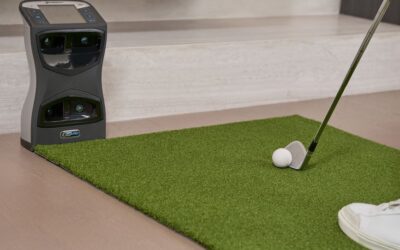
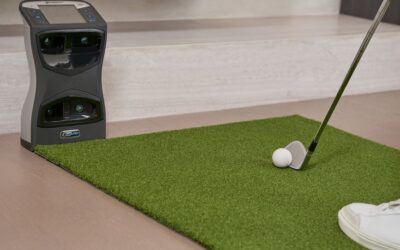
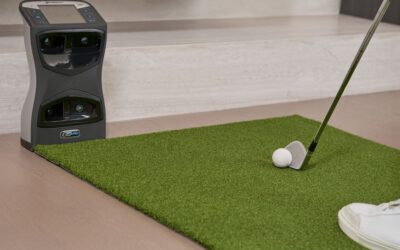
Setting up the Rapsodo MLM2Pro takes minutes. Mount it on a tripod, aim it at your hitting area, download the Rapsodo app, and connect via WiFi. No computers, cables, or complex configuration needed. The device works with any smartphone or tablet, making it incredibly accessible. This simplicity appeals to golfers who want to start playing immediately without technical headaches.
Garmin R10 setup requires more infrastructure. You need a dedicated launch pad or hitting mat, proper mounting on a stand or tripod, and calibration using Garmin’s procedures. Connection happens via WiFi to your phone or computer. While still relatively simple, the R10 demands more physical space and preparation than the MLM2Pro. Integration with golf software platforms requires additional configuration steps.
What Software and Compatibility Options Are Available for Each Device?
The Rapsodo MLM2Pro connects primarily through the Rapsodo app on your smartphone. This app provides swing analysis, distance tracking, and basic game modes. For full course simulation, the MLM2Pro integrates with E6Connect and other third-party platforms, though integration is less seamless than with dedicated radar systems. The smartphone-centric approach keeps everything accessible and intuitive for casual users.
The Garmin R10 supports multiple simulation platforms including GSPro, Uneekor, and Trackman’s software ecosystem. This flexibility is a major advantage for golfers who already own simulator software or want to choose their platform independently. The R10 works with both iOS and Android devices and connects to computers for full simulator setups. This compatibility makes the R10 ideal for building comprehensive home golf simulator installations.
- MLM2Pro: Rapsodo app, E6Connect integration, smartphone-focused, limited third-party platform support.
- R10: GSPro, Uneekor, Trackman compatibility, works with multiple software ecosystems, computer and mobile options.
- MLM2Pro: Excellent for swing analysis and practice, basic game modes, social sharing features.
- R10: Full course play, tournament modes, leaderboards, comprehensive simulator features across platforms.
Key Takeaway: The MLM2Pro offers simplicity with smartphone integration, while the R10 provides flexibility across multiple simulator platforms.
Integration with Popular Golf Simulation Software
E6Connect works well with the Rapsodo MLM2Pro, allowing you to play courses and track statistics. However, the integration requires additional setup and doesn’t include all features that dedicated radar systems access. For golfers wanting premium simulator experiences with graphics and full course libraries, the MLM2Pro’s software options feel limited. This is a consideration if you plan to invest in high-end projectors and screens for immersive play.
The Garmin R10 integrates seamlessly with GSPro, one of the most popular golf simulator platforms. GSPro offers stunning graphics, thousands of courses, and realistic gameplay mechanics. The R10 also works with Uneekor, providing another excellent option for serious simulator builders. This compatibility with premium software platforms makes the R10 the better choice for golfers building dedicated home simulator rooms.
Which Launch Monitor Offers Better Value for Your Budget in 2026?
Pricing for the Rapsodo MLM2Pro typically ranges from $3,500 to $3,800, depending on current promotions and bundles. This includes the device, tripod, and smartphone app access. Additional costs are minimal since you likely already own a smartphone. For golfers seeking an affordable entry into launch monitor technology, the MLM2Pro represents excellent value. The compact size also reduces shipping costs and doesn’t require dedicated space in your home.
The Garmin R10 costs between $3,000 and $3,500, making it slightly cheaper than the MLM2Pro. However, you’ll need to budget for additional items like a dedicated launch pad ($500-$1,000), mounting equipment, and potentially golf simulator software subscriptions. When factoring in these extras, total investment approaches $4,500 to $5,500. Despite higher total cost, many golfers find the R10 worth the investment due to its superior simulator compatibility and comprehensive feature set.
- MLM2Pro initial cost: $3,500-$3,800, minimal additional expenses, smartphone-based operation.
- R10 initial cost: $3,000-$3,500, but add launch pad, stand, and software subscriptions.
- MLM2Pro: Best for budget-conscious golfers wanting accurate swing data without extra purchases.
- R10: Better long-term value if you’ll invest in simulator software and build a dedicated space.
Key Takeaway: The MLM2Pro has lower total cost of ownership, while the R10 offers better value if you plan a complete simulator setup.
Long-Term Investment and Upgrade Potential
The Rapsodo MLM2Pro holds its value reasonably well in the used market. If you decide to upgrade to a premium system later, you can typically recover 60-70% of your purchase price. The device’s smartphone integration means it won’t become obsolete as quickly as hardware-dependent systems. Software updates continue to improve functionality, extending the device’s useful lifespan. This makes the MLM2Pro a low-risk entry point into launch monitor technology.
The Garmin R10 has strong resale value due to its popularity and compatibility with multiple platforms. You can typically recover 65-75% of purchase price on the used market. However, if you invest in simulator software and dedicated space, you’re more committed to the system long-term. The R10 ecosystem encourages upgrading to other Garmin golf products, potentially increasing total investment over time. Consider whether you’re building a temporary setup or permanent installation.
How Should You Choose Between These Launch Monitors for Your Setup?
Choose the Rapsodo MLM2Pro if you prioritize swing analysis, want a portable device, or prefer smartphone simplicity. The MLM2Pro excels for golfers focused on improving their technique through detailed ball flight data. It’s perfect for those without dedicated simulator space who want to practice indoors or outdoors. The device’s compact nature makes it ideal for apartment dwellers or golfers with limited space. If you’re primarily interested in understanding your swing mechanics rather than playing full courses, the MLM2Pro delivers exceptional value.
Choose the Garmin R10 if you want to build a comprehensive home simulator with full course play capabilities. The R10 is better for golfers who enjoy playing virtual rounds, tracking handicaps, and competing with friends online. If you plan to invest in a projector, screen, and simulator software, the R10’s compatibility makes it the smarter choice. The R10 also suits golfers who want reliable club data for equipment fitting and distance control analysis. Consider the R10 if you have dedicated space for a permanent installation.
- Choose MLM2Pro: Portable setup, swing analysis focus, smartphone integration, budget constraints, apartment living.
- Choose R10: Full course simulation, dedicated space, software platform flexibility, comprehensive data needs.
- Choose MLM2Pro: Improving swing technique, practice-focused, traveling golfers, minimal additional equipment.
- Choose R10: Building home simulator room, playing virtual rounds, equipment fitting, long-term investment.
Key Takeaway: MLM2Pro suits swing analysis and portability, while the R10 suits full simulator setups and course play.
Matching Your Space and Goals
Evaluate your available space honestly. The MLM2Pro requires minimal room—just a tripod and enough space for a golf swing. The R10 needs a dedicated launch pad and surrounding area, typically requiring at least 100 square feet for comfortable use. If you’re setting up in a garage, basement, or spare room, measure carefully. The MLM2Pro works in smaller spaces, while the R10 benefits from larger dedicated areas. Consider whether you’ll add screens, projectors, or other simulator equipment that requires additional space.
Clarify your primary goal. Are you focused on improving your swing mechanics? The MLM2Pro’s detailed ball data serves this purpose better. Do you want to play full 18-hole rounds on virtual courses? The R10’s simulator compatibility is essential. Are you a competitive golfer wanting equipment fitting data? The R10’s club metrics matter more. Honest assessment of your goals prevents purchasing a device that doesn’t match your actual needs and interests.
What Are the Practical Tips for Setting Up Your Launch Monitor Successfully?
Proper setup ensures optimal performance from either device. Start by selecting a location with stable, level ground. This prevents vibration interference and ensures accurate measurements. For the MLM2Pro, ensure good lighting conditions—natural light works best, but quality artificial lighting works too. Position the camera at the correct height and angle, typically 6-8 feet from your hitting area. For the R10, ensure the radar has clear sight lines to your hitting area without obstructions.
Calibration is critical for accuracy. Follow manufacturer guidelines precisely. The MLM2Pro requires minimal calibration—mostly just app setup. The R10 needs proper launch pad calibration and radar alignment. Take time to complete these steps correctly rather than rushing. Test your setup with practice shots before relying on data for analysis. Verify that measurements make sense compared to your actual performance. Poor setup causes frustration and inaccurate data that misleads your improvement efforts.
- Select level, stable ground free of vibrations and obstructions for consistent measurements.
- Ensure adequate lighting for MLM2Pro; position camera at proper height and angle per instructions.
- Complete R10 launch pad calibration and radar alignment following Garmin’s detailed procedures.
- Test with practice shots and verify data accuracy before relying on measurements for analysis.
- Keep devices clean and free of dust, which interferes with sensors and cameras.
- Update software regularly to access new features and maintain optimal performance.
Optimizing Your Data Collection
Take multiple shots rather than relying on single measurements. Launch monitor data varies slightly with each swing, so averaging several shots provides more reliable information. For swing analysis, track trends over time rather than obsessing over individual shot numbers. This approach reveals patterns in your technique and identifies real improvement. Most golfers find that 10-15 shots per session provides sufficient data for meaningful analysis without becoming tedious.
Use data strategically to guide practice. If your launch angle is consistently too high, work on technique to lower it. If spin rates vary wildly, focus on strike consistency. Avoid becoming overwhelmed by too many metrics. Focus on three to four key measurements that matter most for your goals. The MLM2Pro and R10 both provide excellent data—the key is using it purposefully rather than collecting numbers for their own sake.
Frequently Asked Questions
What is the main difference between Rapsodo MLM2Pro and Garmin R10?
The MLM2Pro uses camera-based technology for superior ball data accuracy and smartphone integration, while the R10 uses radar for better club metrics and wider simulator platform compatibility. The MLM2Pro excels at swing analysis, while the R10 excels at full course simulation. Choose based on whether you prioritize swing mechanics or complete simulator experience. Both are excellent devices serving different primary purposes.
Can you use the Garmin R10 with multiple golf simulation software platforms?
Yes, the Garmin R10 works with GSPro, Uneekor, Trackman software, and other platforms, providing excellent flexibility. This compatibility is a major advantage for golfers who want to choose their simulator software independently. The MLM2Pro has more limited third-party integration, primarily working through the Rapsodo app and E6Connect. If software flexibility matters to you, the R10 is the better choice.
Is the Rapsodo MLM2Pro accurate enough for serious golfers?
Yes, the MLM2Pro provides professional-grade accuracy for ball flight metrics, with ball speed accurate within 1 mph and spin rate within 50 rpm. Many serious golfers use it for swing analysis and improvement. However, it doesn’t measure club metrics like club head speed or face angle. If you need comprehensive club data, the R10 is more suitable. For pure ball flight analysis, the MLM2Pro is excellent.
Which launch monitor is better for a small apartment or limited space?
The Rapsodo MLM2Pro is significantly better for small spaces. It requires only a tripod and minimal clearance, working in apartments or small rooms. The Garmin R10 needs a dedicated launch pad and surrounding area, typically requiring 100+ square feet. If space is your primary constraint, the MLM2Pro is the clear choice. You can set it up quickly and store it easily when not in use.
What’s the total cost of building a home simulator with each device?
With the MLM2Pro, expect $3,500-$3,800 for the device alone, with minimal additional costs. For a full simulator room with the R10, budget $3,000-$3,500 for the device, plus $500-$1,000 for launch pad, $2,000-$5,000 for projector and screen, and $500-$1,500 for software. Total R10 simulator setup typically costs $6,000-$11,000. The MLM2Pro is cheaper for basic setup, while the R10 justifies higher investment if you want complete simulator experience.
Do both devices require internet connection for operation?
Both devices use WiFi for connectivity, but they function differently offline. The MLM2Pro can collect data without internet, though you won’t access cloud features. The R10 similarly works offline but benefits from internet for software updates and online features. For basic operation and data collection, neither requires constant internet. However, accessing full features and cloud storage benefits from reliable WiFi connection.
Which Launch Monitor Should You Choose for Your 2026 Home Golf Setup?
The Rapsodo MLM2Pro and Garmin R10 represent the two best approaches to affordable launch monitor technology in 2026. The MLM2Pro excels for golfers prioritizing swing analysis, portability, and smartphone simplicity. Its superior ball data accuracy and compact design make it ideal for practice-focused golfers without dedicated simulator space. The device delivers professional-grade metrics at an accessible price point, making it perfect for improvement-minded players.
The Garmin R10 suits golfers building comprehensive home simulator setups with full course play. Its radar technology captures club metrics the MLM2Pro cannot measure, and its compatibility with multiple simulation platforms provides flexibility. The R10 justifies higher total investment if you’ll add projectors, screens, and dedicated software. For competitive golfers wanting virtual rounds and handicap tracking, the R10 ecosystem delivers complete solutions.
Your decision ultimately depends on your primary goal and available space. Ask yourself: Do I want to improve my swing mechanics with detailed ball flight data, or do I want to play full virtual rounds on beautiful courses? Do I have dedicated space for a permanent simulator, or do I need portability and flexibility? The MLM2Pro answers the first question in each pair, while the R10 answers the second. Both are excellent devices—the winner is whichever matches your specific needs and lifestyle. Consider reading our guides on Garmin R10 home simulator space setup and best golf simulator screen sizes for additional context on building your complete setup.







Write Your Review
No reviews yet. Be the first to share your experience!